Investments of Tech & Time

Things are tough out there.

Nonprofits trying to use their data wisely are in a tough spot right now. Budgets are shrinking. Expectations are rising because so many people see AI as a way to magically solve problems. New tools crop up constantly that would be great to experiment with, but those experiments are challenging to fold into the existing tech stack. So many organizations feel like they’ve got increasing data problems, and even getting your arms around them can be a challenge nobody has time or budget for.

There is no way to magically solve these problems, but there are some things we can do to make the situation a little better. A big one is just to make sure that everyone in the organization is on the same page about data. This requires regular communication with people about the current state of things, what’s working, what isn’t, and what the plan is. For example:

Make sure everyone who generates data realizes that’s what they’re doing! If you asked these people at your organization where the data they generate goes, would you get a blank stare?

  • An event organizer
  • Someone who creates a widget on the website to gather information
  • Someone who agrees to receive donations through a new processor – like DAF Pay or PayPal or Venmo 
  • Someone who creates a new newsletter
  • Someone who agrees to collaborate with another organization for partner memberships
  • Someone who orders merch 
  • Someone who sends direct mail

The easiest way to think about this is to restrict people to keep the tech stack consistent. That stifles innovation and encourages people to sneak around.

The harder way is to require people to communicate about anything that generates data. If you’re an organization that encourages experimentation, you might have a policy that people can try something new, but they have to communicate about the data they’re generating and have reasonable expectations about how that data will be integrated into the tech stack.

For instance, if the events team emails everyone to say, “We’re doing a brand new kind of event, the RSVP form goes live tomorrow. We’d like to use this data alongisde our member data in the future, but we get that’s going to take time. Let’s talk about the future of this data. Here’s a shared doc with info about what we’re doing.” That’s both communicating what’s happening and having reasonable expectations. If the expectation is that people will scramble and try to integrate that data overnight, you’re just asking for stuff that breaks and burned out staff.  If the events team just doesn’t tell anyone what they’re doing and later people figure out that this data lives outside the usual tech stack, you didn’t get the chance to decide how to treat this data, and you didn’t get the chance to give the events team useful information like, all of our other systems want first name and last name separated, can you please do that on your events form instead of full name? Giving that info to them early can mean the difference between cleaning up 25 rows of data and 25,000 rows. Getting this data onto the list of known data sources helps everyone understand the complexity you’re dealing with and make plans for the next few months. 

Write down the problems people have with data in one place and keep it updated

This sounds really simple, but most organizations don’t do it. If you don’t fully understand your problems, you won’t design the right solution. This can’t be just the problems the tech team has identified with the data, it needs to include everyone in the organization. Lots of people have problems they don’t realize are data problems, and so asking the question as broadly as you can really helps. You’ll also have to ask at least every six months, because things change!

Regularly review your problems to understand the cost and the source

I don’t know any organization that is fixing every problem they have around data, and that doesn’t need to be the goal of these reviews. When you’ve got reports from people of the problems they’re experiencing, you can figure out where the problem originates. If all your problems are originating from one place, that’s a sign it is time to invest time and money in that part of the tech stack. It is also really important to understand how much the problem is costing you. If most of your problems are in one part of the tech stack but the problems that are the most costly – the ones that do the most to prevent you from reaching your goals is in another, invest in fixing the piece that is most costly for the organization. Having the problems and their cost and source written down also means you can share with people internally why you’re not fixing something that bothers them, as well as help make the case for investment. 

Do these things sound impossible?

These three things are not a small task. The bigger and more dynamic the org, the more time these things take. These things don’t have to be huge time sinks, but they do take real time and attention. If getting these three things done and keeping up with them sounds impossible for your organization , then it is probably time to recognize that you may not be staffed to use your data wisely right now. You may need to make a plan to keep your head above water until you can be staffed to handle things like this. These things aren’t a job you hire for, it is a way the people who do all the jobs collaborate, and collaboration takes time. Technology requires an investment of money, but without the investment of time, it won’t ever be as successful as it could be.
What Is Your CRM for?

15 years ago, when I started working with nonprofits and their data, moving data from one system to another was frequently pretty difficult, and so we had a lot of motivation to put all the data we needed to answer a particular set of questions in a single system. At the time, Salesforce was  clearly the best tool for a nonprofit that had data in multiple systems. It made a lot of sense for a nonprofit to say Salesforce is the single source of truth, particularly for revenue. 

Everything in that paragraph has changed.

It is now much easier to move data from one system to another. Across the boards, tools are expected to connect to other tools. Middleware like Zapier is available even for very small organizations. For all kinds of reasons, Salesforce isn’t nearly as compelling for nonprofits as it was then. It isn’t at all clear that organizations need a single source of truth the way they used to.

That’s not to say I want to see nonprofits with conflicting revenue data in different systems – that would be a nightmare! But it does mean that organizations should take a moment to think about exactly what their CRM is for and what it isn’t for. Maybe it is your single source of truth, but maybe it is a tool primarily to support fundraisers, which is a different thing entirely. Maybe the CRM is a window into most transactions, but not the place you do much analysis, because if you rely only on reports in your CRM you’re settling for less information when you go to make decisions. 

Whatever you’re trying to do with your CRM, say it out loud and write it down. Anytime you ask it to do something new, make sure it is consistent with that use, and make sure there’s not another tool in your tech stack that could do a better job of it! We’ve got so much more choice when it comes to reasonably-priced tools now, we shouldn’t insist on doing everything in one place.

These decisions shouldn’t be made by a tech team or by a fundraising team in isolation. The decisions have got to be collaborations between the teams responsible for these things, and leadership should be aware of the decisions that have been made. Collaborating like this can be uncomfortable for everyone involved, but with the right guidance the results can be transformative.

Preparing for Change

A few things recently have made me rethink my role with my clients recently in ways that I think are really interesting. One thing that has influenced me is the excitement coders have had in the last few months about the capabilities of AI generally, but specifically Claude. Another is the growing and improving list of tools that nonprofits are finding useful for raising money and tracking data. When I started working with nonprofits and their data about 13 years ago, the landscape was very different. 

I’ve never thought of my job as Salesforce-specific, even though I have spent a lot of the last 13 years working inside of Salesforce. When I started, Salesforce’s API and ecosystem really didn’t have any competition in the nonprofit space. That’s not true anymore, which is wonderful. Realistically, I think most of the organizations that I work with that are using Salesforce today won’t be using it in 10 years. I’ve cleaned up a lot of failed migrations in the past, and I don’t want my clients to experience anything like that as they make changes in the future.

How does all of this effect my work? For one, when organizations come to me when they’re still exploring their options, I don’t push Salesforce at all. I’m happy to speak to the pros and cons and try and help them figure out what their specific pros and cons will be, but I don’t want to be the person who talked a nonprofit into Salesforce in 2025. I haven’t seen a CRM that is clearly better for most organizations, but it is easy to imagine one or two emerging in the next few years. 

Another way this is effecting my work is that I want my clients to be prepared for big changes in the next few years. I don’t think any of us know what that those changes will look like, but there are some things to think about and focus on that can make any organization better prepared. I charge by the hour and don’t ever just go off doing work for my clients unless they want to pay for it, but it doesn’t cost them anything extra for me to approach the work with an updated mindset. With that in mind, here are some things I’m trying to think about when I help clients make decisions about what to invest time and money in.

Examining Complexity

All organizations have some complexity that is very specific to their own program, and supporting it requires investment of time and money. Whenever we’re talking about investing more time and money into supporting complexity, I want to make sure this is complexity that the organization really needs. Sometimes the complexity makes a big difference to the program and needs to be preserved. Sometimes it hasn’t been thought about for years and can be simplified. I’m not against continuing to invest in complexity in existing systems, but I want to make sure organizations consider how likely they are to still want that complexity in a few years to be part of their prioritization process.

Clean Data

While I don’t want to make many predictions about what the landscape will look like 10 years from now, I feel pretty confident saying that clean data will still be really important. Lots of change gets bogged down in dirty data, and I’m guessing the changes we’ll see in the next few years are no different in that way.

Explaining Data

Talking about data with people who think about other things all day can be tough. People talk about how important documentation is a lot, but frequently people don’t talk about the kind of documentation that explains the data to people who aren’t familiar with it. That kind of documentation is the same kind that explains data to systems that aren’t familiar with it, whether that’s a new integration or a migrating to a different CRM or to something that isn’t a CRM but that replaces CRMs. The more we write down what data is important to us, where it lives and how it gets updated, the easier the changes will be.

Explaining Functionality

It is impossible to effectively change the tools you’re using if you don’t understand what your current tools are and aren’t doing for you now. This is also documentation, but most documentation doesn’t come at things from this angle. Lots of organizations have documentation of what project has been undertaken and even how the project was implemented, but documentation that explains what functionality an organization has an why is less common, but more useful for planning and evaluating change and understanding how effective an updated system is compared to the old one.

Logic Location

I’m using logic here as a shorthand for anything other than tables of data. It might be code that transforms Stripe transactions into a donation record, it might be automations that calculate a donor’s membership level, but all of that has to live somewhere. It has always been important to put that logic in the place that is the most maintainable and best able to handle the job. Now I think they should also be thinking about what location is going to be the easiest to migrate to something else.

Centering Humans

This last one isn’t a change for me at all, but I mention it because I think it is an important part of thinking about change. Even if you’re an executive dreaming about laying off all the humans who work for you, some part of your work is still ultimately about humans. Nonprofits serve humans, and nonprofits need humans to support them. When we’re thinking about what to invest time and money in and what is going to still be important years from now, I want to always come back to: what is going to work for the humans? 

Preventing Massive Data Messes

I’ve been hired several times to clean up a database that is a big mess. I really enjoy these projects, and I’m really interested in the patterns that show up across these projects.

Unsurprisingly, one thing most of these projects share is that work was done in the past without a well though out plan. The internet is full of explanations about how a good, written plan pays off for everyone involved, so I won’t repeat those here. They’re true, though! Without a plan, everyone is just a six year old throwing their foot up as high in the air as they can to try and kick the soccer ball. With a plan, any of us have the potential to be the older, better player who can stop the ball and decide where to kick it. 

Another thing these projects often have is that the person closest to the data has developed a focus on edge cases in the data. I suspect I’ll never figure out whether the person shows up with a focus on edge cases as part of their personality or if the environment creates that in the person. However it happens, once the person who is closest to the data has this focus, things begin to warp around that. Part of cleaning up the system is to refocus the whole team.

Most systems I’ve worked in have a lot of fairly typical data – for instance, online donations. These records get created automatically and are generally consistent. There can be all sorts of issues with this kind of thing, but that’s a topic for another day. Most systems also have a small set of records that are truly atypical and that need some handling that the typical records don’t. 

A team needs to recognize that the first priority is to get the typical data right, and that this happen with as little human intervention as possible. A team also needs to be able to talk about typical vs. atypical data and recognize that there’s a difference! I’ve had several experiences where people have simply stopped seeing the typical data. I don’t necessarily want people to spend more time on the typical data, but I do want them to understand it and see how it is being handled automatically. 

I think that saying people need to recognize something and talk about it sounds pretty squishy, but the reason it matters is that when we start talking about atypical data, the easiest thing in the world is for the team to ask for a change based on atypical data, and in the process break the things that are working for the typical data. 

If teams were incredibly precise in their requests, perhaps this wouldn’t be an issue. If people implementing the changes were fully aware of the typical and atypical data and how the team worked day to day and felt comfortable saying, “actually, your request isn’t possible without breaking something more important,” perhaps this wouldn’t be an issue. But usually a team is making somewhat imprecise requests and handing the off to implementors who are missing a lot of context and who are incentivized to just complete the change rather than to figure out if it is a good idea or not.

If you’re stuck in this cycle, there are a couple of questions you can ask an answer that may help people refocus. 

  • Can you personally explain typical vs. atypical data in your system?
  • What works for typical data?
  • What doesn’t work for typical data?
  • What kinds of data cause your team the most problems? For each of the kinds of problems you’ve talked about recently, do you know what percentage of your records are like that? I once worked with a team that was spending a massive amount of time on records that felt very common to them because they spent so much time on them, but were in fact vanishingly rare in their system. Just pointing out how few of them there were changed the conversation entirely.

When cleaning up a troubled system, I like to start with the typical data and get those integrations and automations working really, really well so that people can stop working on them and just use the data. Doing this usually turns up some things contortions in the automations for atypical data, and those contortions seem to always cause problems for all the data – not to mention how difficult they are to maintain over the long-term.

Once the typical data is in order, then we can get to how to handle atypical data in the simplest possible way, with a plan and documentation so that we can maintain it as atypical things evolve. When dealing with atypical data, I like to start with the highest volume issues and move towards the lowest volume issue. If you’ve got some type of atypical data that someone has to spend 10 minutes a quarter updating because there’s no automated way to handle it, that’s probably not even a problem we should solve, and once we’ve gone through this process, nobody even has to say that out loud because it is so obvious. When that 10 minutes is just part of a constant avalanche of manual updates, it seems like a bug. 

Timeline Display

Salesforce announced Nonprofit Cloud a while back and lots of organizations now have to decide if they’re interested in migrating or not. For an organization with a mature NPSP instance, the cost of moving to Nonprofit Cloud is significant. I did have a user let me know that they found the timeline feature (described here in the Donor Engagement) section very appealing. I can see why! This particular organization is in no position to move to a new product right now, and so I wondered how easy it would be to build something quickly that would give them “good enough” access to similar functionality. So many non-profits are moving so fast and with such limited resources that I like to at least look at good enough options before choosing something much more expensive and time-consuming.

While the solution I came up with lacks the really nice visualization of Nonprofit Cloud it is extremely fast to implement. If used in combination with some field value that indicates a Task or Email is important enough to belong on the timeline, it could provide users with a lot of value for very little investment of time or money.

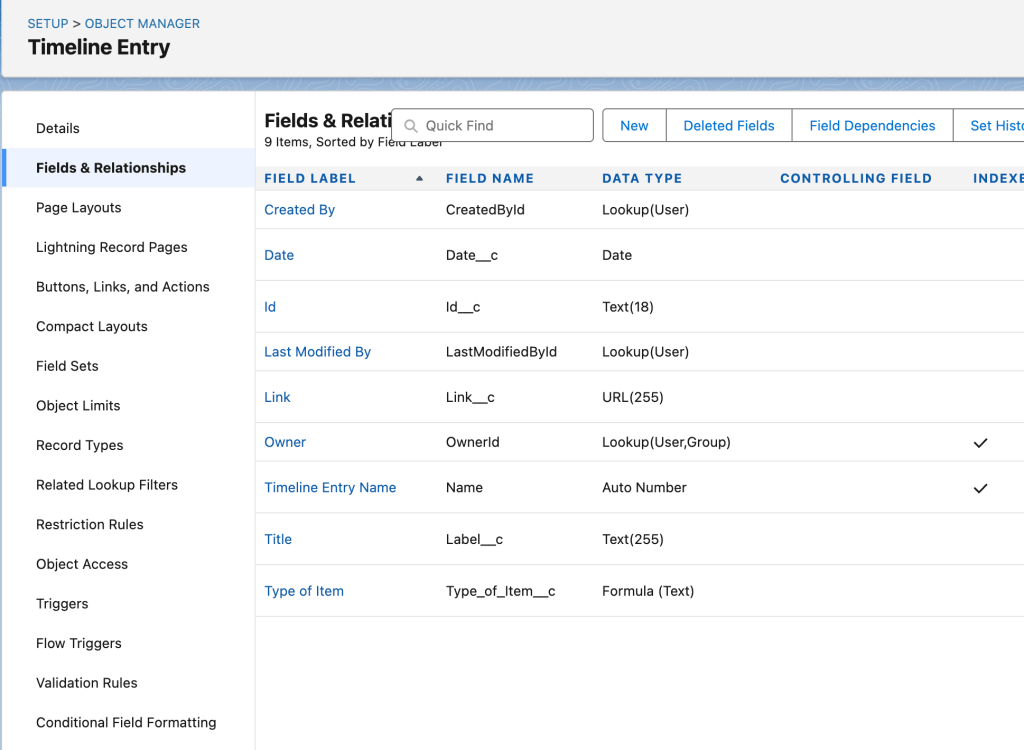
First I created a custom object called Timeline Entry. These records don’t actually get saved.

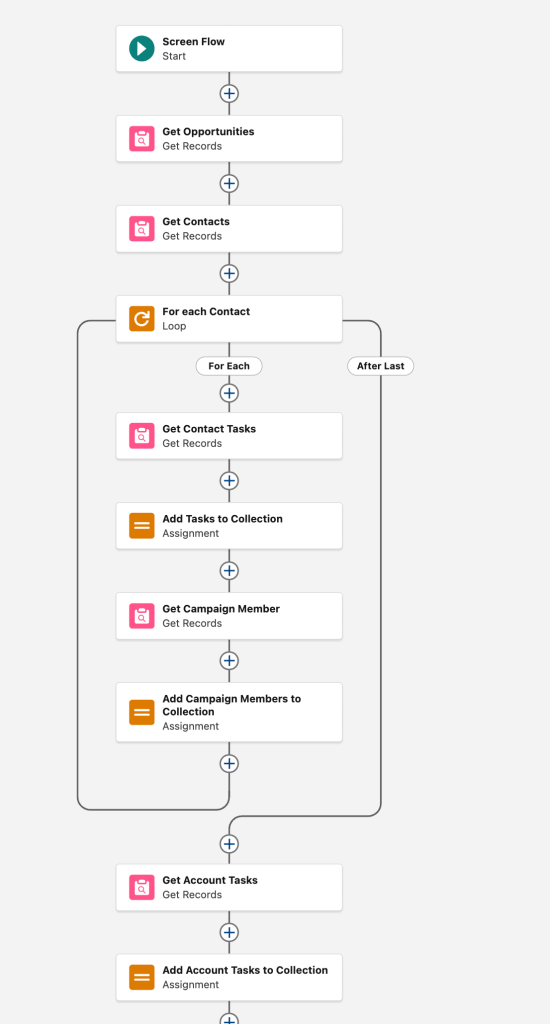
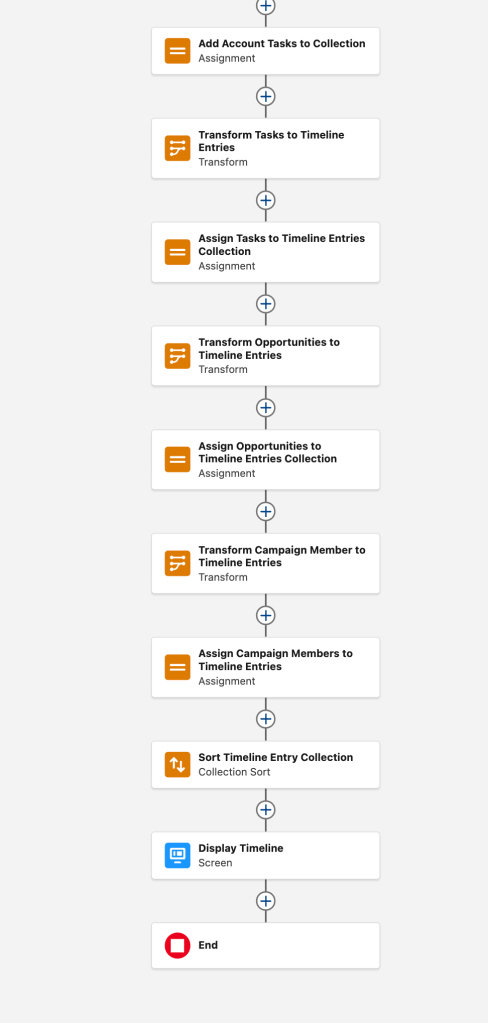
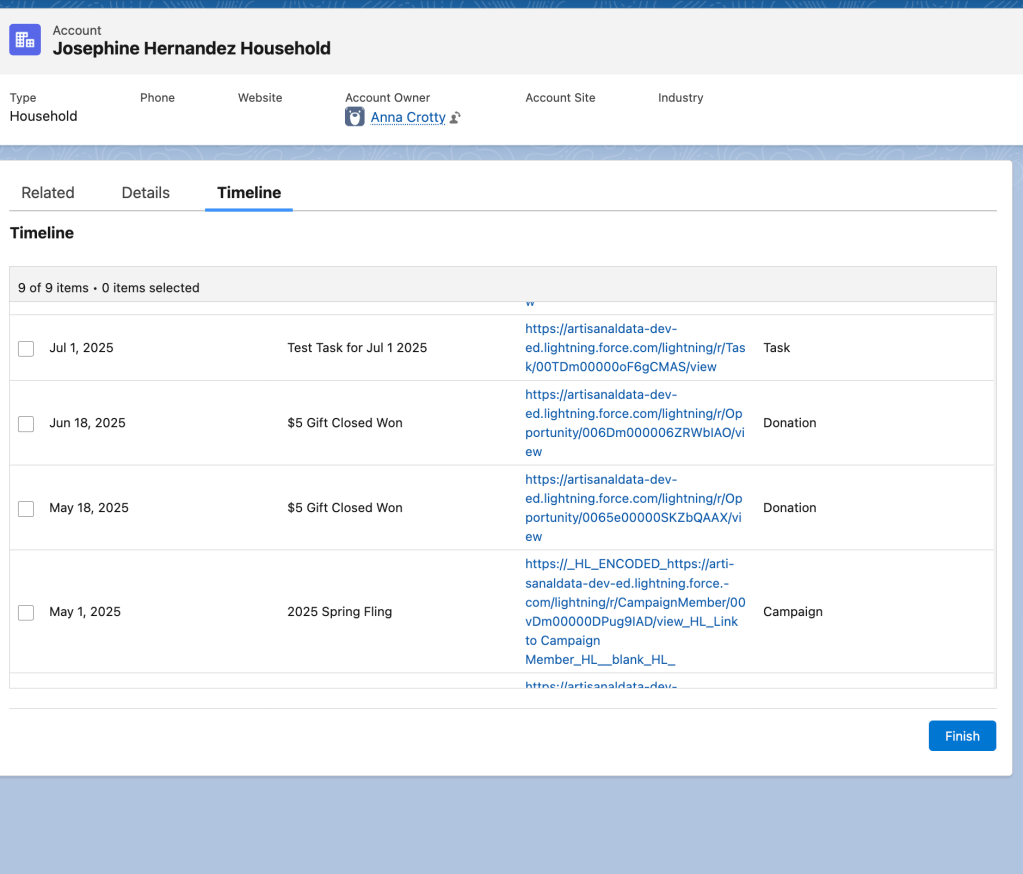
Then I created a Screen Flow, available on the Account page. It gets Tasks, Opportunities and Campaign History for the Contacts in the Account and displays them in chronological order. I was not able to add Files to this view. In order to easily search for Campaign Member records, I added new fields to that object for Campaign Name and Campaign Start Date. Once those records are retrieved, it assigns them to Flow variables that are Timeline Entry records. A Data Table widget in the screen flow displays the Timeline Entry records in chronological order, with links to those records. There’s no DML step to save the records, they’re just assigned to a Flow variable.

The first half of the Flow does have two DML elements in a loop, which is terrible, but for an organization where Accounts almost never have more than two Contacts, this won’t be an issue. In general, if these DMLs hit limits, that probably means the timeline would have been too verbose to be useful, anyway! Any of these Get Records elements could have filters that would ensure the results are manageable, both for the Flow limits and for the user who wants a quick overview.

Note that depending on how the organization uses Tasks, you may not need to get Contact and Account Tasks, or you may need to get them all and then de-dupe the collection – it just depends on the underlying data.

The second half of the Flow uses Transform to assign values to the Timeline Entries and put them in a collection to display.

June 2025: Experimenting with Data Analyses

There’s a whole set of data analyses that can and should be done at almost any nonprofit, and getting those things set up and communicating about them is a priority when an organization is setting up a new system. Once that’s done, however, a lot of fundraisers have some very specific things they want to support their work.

Over the past six months, I’ve worked with a team of major gift officers to figure out how they can best understand their progress over the previous quarter. On a quarterly basis, they wanted to see which of their donors had fallen behind on their typical giving and which donors had stayed current for their typical giving.

We started by talking about various things we could implement fairly easily in Salesforce, like quarterly rollups or matrix reports with quarterly results. Discussing those things in the abstract didn’t get us very far, we had to implement some quick and easy things to give people something concrete to work with. We did that, prototyping some simple things in production and letting them experiment. What we learned is that their definition of current and behind was idiosyncratic, but also really useful for managing their portfolios.

None of the simple experiments did what they wanted, but the conversations around those things really increased the specificity of what they were asking for. These major gift officers really stuck with the conversations even when it was time-consuming for them, and I’ve been grateful to them the whole time. After a few rounds of experiments, they were able to clearly articulate that they wanted a quarterly classification of donors’ movement based on a comparison of the donor’s previous 4 quarters of giving. The details of what they wanted were too complex to quickly prototype in Salesforce, and so we agreed to give it a try outside of Salesforce to both see if we could develop an algorithm that could consistently classify donors the way these major gift officers envisioned. I used a jupytr notebook to take data once a quarter and classify the data, and then provided a spreadsheet of donors and their classification back to the major gift officers. This was a great way to identify edge cases, and there were a lot of them! This organization has a lot of donors whose giving patterns are pretty irregular, and accounting for all of that took a few iterations. We did land on a system that they were happy with, though, and now we have clear instructions for a Salesforce implementation. It will be more complicated than anything we could have quickly built in Salesforce, but it is doable, and now we know the effort is worth it!

Something I always worry about with complex Salesforce requests is that the team making the request will get what they’ve asked for and then never use it. I’ve seen organizations spend tens of thousands of dollars on complex solutions that it turns out they didn’t really need and never use. Prototyping – even outside of Salesforce – allows people to reflect on what they think they want without such a big investment.

For me, the whole experience reinforced how important experimentation is, and also how much the users need to participate in a process like this. We could never have understood the many edge cases without the major gift officers committing a good chunk of time to going through lots of examples and providing substantive feedback to each iteration.

April 2025: Retention

For the past 10 years, I’ve been having conversations with people about retention metrics. It is a really challenging thing to work on for a couple of reasons, none of which are technical!

Any time an organization wants retention metrics, I’ve got to dig in to what they mean when they say retention. Is a donor retained if they give once each calendar year? Once each fiscal year? Is a donor retained if they give every 18 months? Do you want to calculate different retention rates for recurring and one time donors? There are even organizations that calculate retention based on the supporter’s original cohort. In that scenario, if someone donates for the first time in 2010 and have given 14 of the past 15 years, they were considered lost in the year they missed, and the retention calculation never picks them up again!

Once we’ve had some initial conversations about what they mean when they talk about retention, we can move on to specific ways to calculate retention. There are several reasonable, widely-used formulas, and from my point of view, it doesn’t matter which one you choose as long as you can stick with it for a while and can explain it to people in your organization.

Salesforce has a post about one formula here. Another option is here. My personal favorite is the News Revenue Hub’s. All of these are good, practical options. The big thing organizations need to avoid is making the calculation overly complicated or manual, which tends to make the results inconsistent over time. The goal is to be able to see the direction retention is going over time and take action based on that, so consistency is key.

Recently I worked with a team that was tracking retention, but also wanted reports on their retention successes and failures over the last quarter for each portfolio. This was not at all about a rate. This was an effort for portfolio managers to look at their donors and understand if those donors were ahead, behind, or even with their giving in previous years. This particular organization has donors who give generously but chaotically, so defining ahead and behind was challenging.

Getting to a point where we could put this information in front of portfolio managers took several iterations, and it took real time from the portfolio managers to dig into the results of each experiment and provide feedback. Ultimately we had to return to the original goals several times to refine our results and come up with an algorithm that would classify donors in the portfolios in a way that was most helpful to the portfolio managers.

So far, this work has involved exporting some data from Salesforce once a quarter and re-running a Jupyter notebook that does the analysis. The result is shared with the portfolio managers in a Google Sheet. We are considering implementing the Jupyter notebook analysis in Salesforce in the future, but haven’t made that leap yet. Jupyter notebook has been a faster, more lightweight way to work on this while we experiment.

This work has been a lot of fun, and I’ve been grateful to have portfolio managers who have been willing to dig into the details and provide regular feedback.

March 2025: More Recurring Donations

My update in January was about things that were cropping up around Enhanced Recurring Donations, and while I continue to find bits and bobs that are a bit annoying, I don’t have anything new and interesting to report on that front. I have been spending a lot of time deep in Recurring Donations, however, but at a different organization.

Back before NPSP existed, it wasn’t entirely obvious how to represent recurring donations in Salesforce! People tried some things. I’m currently working on overhauling one of those experiments that hasn’t aged well. I don’t think anyone involved in the design was incompetent, I just think it was a really difficult thing to understand all the consequences of since nobody had lived with any solution for any length of time!

What that means, however, is that we’re taking data that is radically different from Recurring Donations and child Opportunities and transforming it so that the organization can use NPSP Recurring Donations. We’ve now practiced twice exporting the data, deleting it from the sandbox, transforming it using pandas and then importing it back into Salesforce. I’ve never done such a radical transformation (this is way bigger than migrating from Raiser’s Edge or something like that,) and it has been very interesting.

One big lesson is that the Bulk API option in Data Loader makes something like this possible. I’m importing over 3 million new records, and we’re trying to keep our instance’s downtime to a few hours. We should be able to do that because of that Bulk API feature.

Another big lesson for me personally is that pandas is really well suited to this kind of work. I picked up pandas based on one (very wise) person’s somewhat offhand suggestion years ago, and I keep telling myself I should learn some other tools, but somehow the work I’m doing always seems to be something pandas is quite good for. Being able to do these pretty elegant transformations of 3 million rows on my laptop is great! (I’ll admit it is a very nice laptop.)

January 2025: Enhanced Recurring Update

Back in September, I posted about a recent upgrade I’d done from Legacy Recurring Donations to Enhanced. Since then I’ve learned an additional lesson that seems worth writing down.

I started noticing that we had some Recurring Donations that were getting their future pledge created with the wrong Close Date. Some yearly Recurring Donations had multiple open pledges for the same calendar year, which caused problems in pledge reports! Some monthly Recurring Donations also had two Opportunities for one month.

This effected a pretty small number of our total records, but it was pretty annoying.

It turns out that the Effective Date value is extremely important in creating future pledges. The upgrade guide doesn’t mention this. The guide just says that Effective Date is changed by the data migration process, and that it will be set to the earliest Opportunity’s Close Date. I do not think that’s what happened in our case!

When I look back at our pre-migration data, I can see that we didn’t use the Effective Date field until November of 2019. That’s long enough ago that I don’t remember what changed then, but it does mean that most of our active Recurring Donations entered the migration process with a value in that field. The ones that didn’t seem to be the ones that needed to be repaired after the migration. It would have been great if the data validation had insisted I populate that field before the data could be migrated! I can’t figure out where the Effective Date value came from for these records, but it sure wasn’t correct! The day of the first Opportunity Close Date would have worked perfectly.

We also hadn’t used Day of Month before the migration. That value got populated in the migration, and in most cases it was fine, but I think it must have been using Effective Date to determine that value.

I figured this out only because when repairing these records, my updates didn’t stick until I also changed Effective Date.

I’m guessing we were fairly unusual to have active records with no Effective Date or Day of Month, but I’ll definitely keep it on my list of things to check for future migrations!

December 2024: Just because you can doesn’t mean you should

People I work with frequently assume I work for Salesforce or have worked for Salesforce in the past, and that I’m always going to recommend Salesforce’s solution. None of those things are true! I started using Salesforce (Sales Cloud) because it was the right tool for a particular job. Like most people in the Salesforce ecosystem, I’ve never worked for Salesforce and don’t plan to.

A lot of my Salesforce work involves making it an efficient place for users to do a lot of their work and so I often find myself advocating to put some bit of data into Salesforce rather than leaving it in Airtable or a Google Sheet or someone’s notebook. But sometimes data doesn’t belong in Salesforce, and a recent experience made me realize it can be useful to think through these things!

The same organization that has that stores extensive survey data in Salesforce was planning a new online form. The information they were collecting was very different from the survey data and overlapped with the data they have in Salesforce, but was also pretty different. We met to talk about whether or not the FormStack + Salesforce solution that has worked well for the survey data was the right approach with this new project.

We considered a few factors and eventually decided to not use Salesforce for this data. We expect to import a little bit of the data involved in this new project to Salesforce once the project is complete.

Arguments for using FormStack + Salesforce

  • We’re familiar with both tools
  • The experience of the person submitting the information would be good
  • We’d be able to store the data in a way that would improve our full understanding of some people and organizations already in Salesforce

Arguments against using FormStack + Salesforce

  • Once the data is submitted, the people who need to work with it are not Salesforce users, and really shouldn’t be Salesforce users. If we made them Salesforce users, we’d have to pay for their licenses for a year and we’d have to set up new profiles and permissions for them.
  • Most of the submitted data doesn’t overlap with existing data, and we’d have little use for it in the future.

And so we decided not to use Salesforce for this project! As of today, small to medium nonprofits who need to be able to connect other systems to their CRM have trouble finding a better choice than Salesforce’s Sales Cloud product. I expect that will change in the future and I’ll happily switch to a better tool for the job when it exists.