February 2024 – Survey data

Last year, I worked with an organization to launch a big survey of their members. The organization is small, but the survey is big, and they expect to keep doing it annually for many years. We’d planned on using Form Assembly, but the pricing changes there made that impractical. We switched to Formstack. There are definitely some things I prefer about Form Assembly, but it seems like Form Assembly just doesn’t want small customers anymore. We had a very good experience with Formstack’s customer service, which I appreciate. I would recommend it again for a similar project.

The survey data included a lot of information that was unlikely to change much over time (mission statement, for example) and some information that was likely to change regularly (number of staffers.) Because the survey included so many questions, they wanted someone filling it out to have the survey prefilled with the previous year’s answers.

The survey data was generally descriptive of the organization filling out the survey, and that organization was represented by an Account record in Salesforce. In order to make prefilling practical, and to allow easy reporting on the current values for all of the survey questions, we created a lot of new fields on the Account to store this data. We put those fields on a separate tab on the Account Lightning Page.

However, we also wanted to be able to track changes over time to the answers, and to be able to reference any past answers.

We let the Formstack survey update the Account fields directly. We used one field on the Account to indicate the last time the survey had been submitted, and when this field changes, a simple, record-triggered Flow copies those new survey values into a survey history record. The most recent historical record matches the current values on the Account. It took some time to set up, but the rollout was smooth, and the data is good.

December 2023 – Loom

I’ve been using Loom for a little over a year now, and I don’t know how I ever did my job without it. We’ve had ways to create videos and share them for a long time, but the ease with which Loom allows me to create videos and for others to watch them is such a massive improvement over anything else I’ve used. Here are some scenarios where I’ve found it helpful. I find that people do go back to them sometimes, which is helpful, but also it relieves them of taking notes because they know they can go back to a video.

I’ve even had users tell me they get excited when they get a Loom link from me! They’re probably exaggerating it, but no one has ever said they’re excited to get a long, screen-shot filled document from me!

  • Someone asks me how to do a discrete task. A 30 second Loom video is often faster for them than reading a lot of text, and is usually easier for them to understand. It is also much easier for me to create than an email or doc full of screen shots, and I can be more sure that I’m being clear!
  • I have something ready to test in a Sandbox, and instead of writing a document of how to use it, I create a video walking the tester through the feature.
  • Before I meet with a new user for onboarding, I send a 1-2 minute video on how to do the most basic things in the system. This lets us focus on more interesting things when we meet.

September 2023 – Batching in Salesforce Flows

When I first started working on Flows, I read this post, which has remained incredibly useful even as Flows have changed and improved. I’ve come back to it several times in the last few months, as I worked on two Screen Flows that needed to do some expensive things in a loop.

I know what you’re thinking – no DML elements in loops! In general, I totally agree. I take seriously the argument that this should have been done with code instead of clicks to avoid this kind of thing. I also take seriously that a Flow is significantly easier to maintain and tweak than code, and that in other ways, a Screen Flow was a perfect tool for these problems.

In both cases, I was starting with external data that needed to be brought in to Salesforce. In both cases, the source data is not great and we have no power to change that. If we’re looking for great, we get rid of these data sources entirely. For a variety of reasons, that’s not an option, so what’s our next best scenario?

The next best scenario is a situation where we can programmatically update the data to be high-quality and ready to go into Salesforce, and then import it automatically. I love that idea. I’m involved in projects like that all the time.

For both of these problems, that option was off the table, for reasons I won’t get into here.

So what next? We could have someone manually update the data and then import it. That’s a real option and one we considered. But in both cases, I wound up believing that a Screen Flow to guide a user through how to update the data, and then having Salesforce update the data automatically was better. In both cases, some human review of the data and decisions made about it were important. Perhaps someday Salesforce’s product that is going to integrate everything easily will solve this problem! In the meantime, a Screen Flow is a pretty good solution.

The advantages of a Screen Flow were how easy they are to build and maintain and change over time, and how easy it is to let users interact with data. Giving up these two advantages would have made these projects prohibitively expensive over time.

The disadvantages were apparent from the start – with the limits in Flows, we wouldn’t be able to save hundreds of records at a time, which was important.

While I felt guilty about including DML elements in a loop for one these Flows, I wound up believing that this was the least bad of all our options. This Screen Flow takes a file that arrives periodically from an external payment processor and guides the user through finding matching donors and creating Opportunities and Payments. (UnofficialSF’s terrific Improved File Import tool was so helpful with this!) Unfortunately the donor information in the file is sometimes definitive and sometimes missing entirely, and so that review by the user was important. For each row in the file, the Flow would search for matching donors and then present the options to the user. The user could choose one of the matches or choose to create a new donor record. While this is tedious, it is still better than doing those searches and creating the Opportunties by hand. Once that review step was over, the Flow is left with collections of Opportunities and Payments that now need to be saved, and while this part wasn’t in a loop, that step turned out to be too expensive for the Flow with some files. To solve this, I batched the records to save and did it in small chunks. To force the Flow to complete the batches, I added a screen between batches.

The user didn’t have any need to interact with these screens – they existed purely to deal with the limits. Since the user had already stepped through lots of screens to choose donors, I didn’t want to ask them to do more work. Fortunately, UnofficialSF has a solution – the Auto Navigate component. This lets the user go off and get a cup of coffee while the Flow finishes up.

Each of these Flows makes me a little queasy – they’re not what I consider best practices and I look forward to the day when Flows are so sophisticated that I can update them to be something I’d really be proud of. What I know is that these flawed screen Flows are a big improvement over the manual data entry that was required previously, were possible to do on a very small budget, and can be changed by multiple members of the team. Sometimes pretty good is just fine.

I also took advantage of UnofficialSF’s . As usual, UnofficialSF’s Flow components are incredibly useful.

May 2023 – Stripe Connectors

I started working with Stripe in 2016, and I’ve always really liked it. Back in 2016, Stripe didn’t support recurring payments, which was a problem for the organizations I work with, and there were no good connectors available to connect Stripe and Salesforce. Things have changed a lot since then! Stripe has added more payment methods and support for recurring payments, which Stripe calls subscriptions.

Bobby Wright recently brought the Stripe Universal Salesforce Connector to my attention, and this is such a big improvement over previous out of the box tools I’ve seen to connect Stripe and Salesforce. It allows you to listen for Stripe Webhooks in a Flow and then take steps in Salesforce based on the information sent by Stripe. This should mean that it is practical to match to Contacts and Accounts and avoid duplicates, which I think is critical. It should also make it fairly easy to connect subscriptions to NPSP Recurring Donation records and child Opportunities.

I think this has the potential to bring Stripe to a lot of organizations that couldn’t really make it work before. Being able to do all of this inside of Flows means that more people will be able to set up a project like this and maintain it – as long as that person has a good understanding of what is going on in Stripe and what Stripe calls everything, as well as a good understanding of what is going on in Salesforce and what things should look like there. Lots of integration projects get built by people who understand one system but not the other, and that’s a great way to waste time and money.

February 2023 – Thinking about new data sources

The non-profit world is changing a lot, and that means that new data sources show up all the time. Some of them are a flash in the pan, and some wind up being core to the organization’s work.

I had a great conversation with some organizations recently about how to approach and think about new data sources. We talked about a couple of important questions that can guide your organization’s relationship with a new type of data. The idea is that as you experiment with a new kind of data, you can work on figuring out the answers to these questions. When you have answers to these questions, then you’re ready to build things around this new data.

As you figure out the answers to theses questions and most importantly, after you’ve answered them, revisit them regularly and with a lot of different people. That helps to keep everyone on track, and helps everyone say no to rabbit holes that look tempting along the way. Remember that while this data may be something you’re up to your elbows in every day, for other people you’re talking to this is something they don’t think about for days at a time. Remember to frame the conversation for them each time you talk, and to point them to a reference where they can get the information they need.

How mature is our relationship with this data?

Some kinds of data you’ve been working with for a long time – for example, donation data. Everyone is probably pretty clear on the most important things you need to know about each donation and about donations in aggregate. You’re probably always making some adjustments, but your relationship with this data is mature.

Some kinds of data are new and constantly changing and it isn’t entirely clear yet what everyone wants from it. I’d call that relationship experimental rather than mature. Experimental data is exciting and may wind up being really important, but while we’re experimenting, we’ve got to resist the urge to build something big around it, and we’ve got to communicate clearly about how this is different than data that we have mature relationships with. It can be really tempting to have people “integrate” new data with some existing system, but if you do that before things are settled, the results are probably going to be terrible.

If you communicate broadly about the experimental nature of what you’re working on, it will be easier to manage everyone’s expectations and to keep your options open. The CEO won’t be surprised if you say different things about this data each month if they know it is experimental.

What questions do we hope this data can answer for us?

Early on, your experimentation of the data may be to help you figure out what questions you’d like it to ask, but you probably have some ideas. Write down what you do have, and communicate that broadly and regularly. Remember that what’s obvious to you isn’t obvious to everyone in your organization, and that people need to be told things several times.

If you don’t know what those questions are yet, or if that list is changing constantly, it isn’t time to finalize much of anything about this data. Keep things loose and communicate clearly and widely about where you really are with the data.

What actions do we hope to take based on what we learn?

If there’s data you spend time and effort on, it should be supporting actions you take that can make a difference for your organization. With new data, you may be figuring out if there are actions you can take, but if you figure out that there aren’t, it is time to stop spending time and effort on that data.

As you work with a new type of data, be looking to see what actions the information could support. Until you have some clarity on what these actions are, it will be impossible to build the tools you’ll need for the longer term.

Some easier questions

These questions are easier but just as important – if you start building things or integrating this new data without answering these questions, you’ll be unhappy with the results.

  • A list of stakeholders who will use the data
  • A list of tasks each stakeholders will use the data for
  • A list of systems that generate the new data
  • A list of systems that store data related to the new data, but that don’t generate it
  • What level of detail does each task require?
  • How does each system understand a constituent?
  • Where does identity reconciliation fit in?
  • How often do we need this new data to be refreshed for it to be useful?

Moving Forward

Being purposeful about an experimental phase with new data can feel like slowing down, but you’ll save a lot of time and effort in the long run if you do!

December 2022: Why Contacts

One thing that non-profit Salesforce users run into right away is Accounts and Contacts. If you’re coming from a classic non-profit database, this distinction is confusing, and there’s a real tendency to use Accounts for reports and day to day work. I always encourage people to resist that urge.

If you ask your Salesforce expert, can we do X on Accounts, the answer is almost always yes. The important question to ask is not if it can be done, but if you’ll be glad you did it that way in a year or two. Frequently with Account vs. Contact things, you’re really choosing between making a small behavior change now and then being able to use lots of native Salesforce functionality versus no behavior change now and losing access to all of that native functionality and having to maintain the more customized choice you’ve made. When you’re sitting down in front of a new system, that small behavior change seems big because you’re adapting to a lot of new things. I always recommend giving yourself some time as you get used to the new system – a change you can’t imagine making might seem quite manageable a few weeks later.

The smaller and more budget-constrained an organization is, the more important it is to go with the minimal amount of customizations. Salesforce is powerful because it allows so many, but every custom choice you make has to be maintained over time, by the people who will do your job after you. Try to be as kind to them as you can.

Why focus on Contacts?

In short, native functionality and integrations are pretty Lead and Contact focused, and so your life will be easier if you go with the flow.

Salesforce assumes that Contact information like phone number and email belongs primarily on the Contact. Salesforce assumes that you’ll use Contacts for sending emails and Campaigns and things like that. There are ways to do these things with Accounts, but in my experience they leave you swimming upstream. The more closely your instance matches what most of the ecosystem is doing, the more benefit you can get (for free!) from Salesforce’s investment in the platform. The more special your instance is, the more you have to keep layering workarounds on top of workarounds, and seeing new features that don’t help you.

Another huge advantage of using Salesforce is access to the thousands of integrations available. They tend to be very focused on Contacts or Leads, because that what most Salesforce users are focused on. Email integrations are particularly focused on Leads and Contacts, and if you’ve got an Account-focused Salesforce instance, integrating with any of them is very difficult.

How to focus on Contacts

Focusing on Contacts means that you rarely use Account reports (although there are certainly uses for them, even in a very Contact-focused instance,) and that when users are working with records, they’re looking at and updating Contacts rather than Accounts. There are a couple of steps to take over and over to stay focused on Contacts.

New fields

If you’re being asked to add new fields to the Account record, this is a good time to take a look and see if the information ought to be (or is already) on the Contact. You may need a new Account field, but you might need to change your page layouts so that users can see Contact information easily from the Account page.

In general, keeping data in one place is often sufficient. If you’re trying to focus on Accounts, you’ll likely find yourself trying to copy information from Contacts to Accounts and vice-versa. This gets messy fast! Sometimes we need to copy things to different records, but don’t do it unless you have to – it is just one more thing to break on some Giving Tuesday down the road.

Page layouts

One way to encourage users to focus on Contacts is to make Account page layouts pretty minimal. Lightning layouts make it much easier to show users Contact information from the Account page, which also helps.

Reports

As an admin, you can run a list of Reports that have been run recently, and if there are any Reports in that list that have a Report Type of Account instead of Contacts and Accounts, take a closer look! If this is a Report that could be a Contacts and Accounts Report, get your users to make the switch now. If there are Account reports that make sense to keep, make sure you understand why they’re necessary. NPSP’s Primary Contact field is really helpful here, as there are plenty of situations where a Contacts and Accounts Report is a good choice, but you want only one row per Account.
September 2022

Why your data doesn’t work for you

Every unhappy database is unhappy in its own way, but there are some common things that come up.

Integrations are hard.

Often when people say their data doesn’t work, they mean they can’t use their data in situations where it is necessary – for instance, if you can’t email just members who have given over $500 or something like that. This problem is frequently about an integration, and the root of the problem is often that someone assumed that dumping data from one system to another would integrate them. An integration is when you take data from one system and explain it to another system, and so they’re harder than anyone wants them to be.

People also say their data doesn’t work for them when they can’t get accurate, consistent answers from their data. The top 4 reasons I see for this are…

The question is poorly-defined.

People in lots of industries talk about retention rate. The dirty secret is that most people who talk about retention rates can’t tell you clearly what they mean by retention, and they may not even mean the same thing each time they talk about it. There’s more than one way to honestly talk about retention, but if you haven’t defined exactly what you mean, you’re going to get inconsistent answers that feel completely wrong. Comparing retention rate between organizations is even dicier. If you’ve been asked to submit your retention rate for a survey and then had it compared to others, the chances that you’re comparing apples to apples is pretty low.

People hate the answer.

I don’t mean to be flip about this – people sometimes ask really good questions and then the answer winds up being so far from what might be useful that they just can’t process it. For instance, if you want to know how long it takes for someone who reads your content to support you financially, you’re probably thinking that the answer is something like six months or a year or even two years. You could do something with that information! You could guide their journey and try to speed it up a bit, or make the messaging particularly attuned to that timeframe. But what if the answer is 10 years? A few months after you ask this question, you’ll probably have stored the experience in your brain as “the data doesn’t work for me,” and you’re not wrong. The data didn’t help you out in this case, because some information isn’t actionable. It just means it is time to ask different questions!

There’s too much distance between the people who analyze the data and the people who are up to their elbows in the data every day.

In most organizations, there’s a lot of distance between the people who analyze data and the people who really understand the data. They’re often far apart on the org chart, far apart in terms of status and pay, and far apart in terms of life experience and worldview. If nobody forces them to talk to each other, they won’t, and your analysis will turn up answers that are just plain wrong. You might have seen the news in 2021 from a county that reported that 200% of people over 65 had received their first covid vaccine dose. We all know that’s wrong! If you don’t track whether someone lives in the county where they’re getting a shot and which dose you’re giving, you can’t accurately report on this number. Lots of organizations do exactly this thing – and sometimes the answer is just as wrong, but it isn’t as obvious.

July 2022

Inspiration

My favorite Flows right now:

  • Delete old email templates
  • Delete very old Payments (I’ll probably be writing a very similar one to delete very old Campaign Member records soon.)
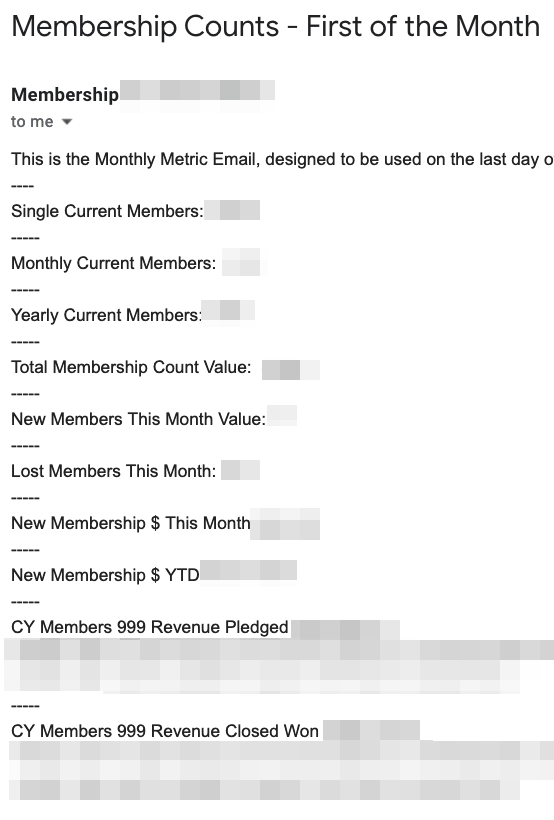
  • Send email with the day’s important membership metrics
  • Send warning emails to donors with upcoming annual recurring donations
  • A weekly scan of Accounts to create cultivation tasks for fundraisers

NPSP Summer ’22 Release

There was an issue where some people couldn’t create or edit Recurring Donations, which was patched on June 22nd. If you had that problem and it vanished – you weren’t making it up!

NPSP Summer ’22 was released in mid-May. The release notes are here, but my favorite updates are:

  • Account and Contact Sustainer Fields, which indicate if Account or Contact is an active, lapsed or former recurring donor.
  • The All Household Members Deceased field lets you know that all the Contacts in a Household Account are marked deceased.
  • Recurring Donation Status Automation – lets you create settings to automatically change the Recurring Donation status when a donor misses payments.

These are all things that you might have developed your own workarounds for. When you’ve got time and if you’re able, I always recommend using the NPSP standard versions of things rather than your own custom version. NPSP is always bug-fixing and updating, and it is easier to benefit from those improvements if you’re using the standard things. In addition, having two versions of something gets confusing really fast, and you can’t delete the NPSP version! Using the standard option whenever you’re able means that your future job is easier, and whoever inherits the org from you will have an easier job.

Salesforce Summer ’22 Release

Summer ’22 is live, and even if you don’t care about anything else, I really recommend that you start taking advantage of Dynamic Related Lists. A really simple use case that most users appreciate is to separate out Closed Won Opportunities. Salesforce Ben has a nice explanation. Many of us have done various things over the years to get functionality like this, but this is another case where switching from a custom solution to using the simple, out-of-the-box option will save you money and headaches in the future.

April 2022

Inspiration

As promised in my last post, I’ve been experimenting with UnofficialSF’s Flow Actions. I’m in love with the Execute SOQL query action.

With it, I was able to create a Flow to send a daily email with metrics from Salesforce. The SOQL query lets me do things like get the membership revenue so far this month and member counts without looping through all those records.

I’ve got plans to use this same kind of Flow to send myself data quality monitoring emails. There’s nothing wrong with reports, but sometimes getting a single email that shows you where things are is really helpful!

If I wanted to show member count progress over time, I’d need to use Reporting Snapshots or something similar. (Reporting Snapshots are great, but they’re an extra step.) In this particular case, I wanted this data in an email is because it is destined for Google Data Studio, where it lives with website data that doesn’t belong in this Salesforce instance. While you can set things up to automatically go to Google Data Studio, sometimes it is nice to have someone take a look at the numbers before they go in, and to have a record in an inbox in case things go wrong.

Fancier solutions are definitely available, but this one is simple and cheap.

Salesforce Release Information

Summer ’22 is coming! Sandbox preview will start May 6, when we’ll start getting more information about what to expect. It looks like we’ll get some nice Flow updates, as well two report improvements you’ll probably like. They’re both described here – an easier way to choose a Report Type (which is the hardest thing about Salesforce Reports!) and more inline editing. Another update I’m excited about is Scoping Rules. For years I’ve watched new users trip over the default records they’re shown. It is incredibly common for new Salesforce users to believe their Salesforce instance has no data because of all those empty Recently Viewed screens! Being able to refine without restricting has real potential to improve the user experience.

February 2022

Inspiration

Lately I’ve been working on some task automation that required code in the past and doesn’t anymore, thanks to Flows.  Flows can replace Workflow Rules and Process Builder for acknowledgement tasks, but Flows can also perform weekly scans of major donor accounts to see who qualifies for a cultivation task.

Flows have real potential for automated data cleanup, as well, but for now you’ve got to use some workaround to deal with the various limits, which aren’t as clearly documented as I’d like. (They are documented, but in my experience the information is all a little scattered.) There’s this Idea you can upvote.  There are also some workarounds out there, including pauses and Unofficial SF’s Flow actions, which I’m hoping to play around with in the next few weeks. 

Scary Emails from Salesforce

You probably got two different emails from Salesforce recently. You might have gotten a dozen versions of the one about deleting Sandboxes. Those seemed to go to all users, not just System Administrators, which caused a lot of confusion. I think the thing that confuses people is that every few years Salesforce decides to delete all of the unused Sandboxes, rather than doing that kind of thing regularly.

The next email was about Enhanced Domains. (Before we go any further – if you aren’t using My Domain, please start using it now. ) It was a little easier to parse than a lot of Salesforce emails. All of these emails are tough for Salesforce to write. They can’t know all the things you might have customized in your org, and so they can’t predict what might break when they make a change. In my experience, they’ve worked pretty hard to make sure that simple instances don’t have to make changes.  (This is also a reason to choose simplicity whenever you can – you’ll have much less to worry about from future changes.)

This email included links to good resources. (There are always links, but sometimes they’re even more confusing than the email.) In particular, this page helps you figure out if your org can turn on Enhanced Domains today. This group (login with your Salesforce credentials) is dedicated to helping people with the change. I’m guessing that the orgs I’m working with right now won’t have any trouble turning this on, but I’m playing with it in a Sandbox now to be sure. I’ll update again in a month!

NPSP Release Information

This Trailhead is an easy to understand explanation of what’s new. I’m curious about these Einstein predictions. I’m always very skeptical of this kind of thing, since if there’s one thing I know, it is that data isn’t just data! The video shows a Contact who has already given with a less than 100% chance of becoming a first time donor, which makes me even more skeptical. I’ll be keeping an eye on this and hoping to hear from people who have used it successfully. For the moment, I’m not turning it on.

Salesforce Release Information

A similar module is available for Platform and Apps for Spring ’22. The Flow improvements are always very useful. Beyond that, I was disappointed to find out that backup and restore is going to be pretty expensive – I haven’t heard anyone talking about less than $12,000/year. At that price, plenty of orgs would just keep doing weekly backups or stay with their current third-party backup app. Pricing for new Salesforce features and products is always a mess early on, so this is worth checking in on later on this year.

Flow Orchestrator is another thing I’m looking forward to using. Because it looks like that will be included in Service Cloud licenses, nonprofits should have access to it with all 10 free licenses. (Additional licenses that include Service Cloud are a little more expensive than straight Enterprise Licenses.)