January 2022

Inspiration

I’ve been thinking a lot about documentation in the last six months. Across the Salesforce ecosystem, people seem to agree that documenting a Salesforce instance is an ongoing challenge, and there aren’t many best practices or templates to follow. As I’ve worked on various bits of documentation recently, come up with a few guidelines that I think will stick for me, as well as a sample.

Break things into digestible chunks

Users and admins are most likely to read documentation when they’ve got a question. The easier it is for them to focus on the thing they’re currently interested in, the more likely they are to read and retain what you’re trying to get across. I’ve found myself writing documents around specific functionality – profiles and permission sets, or a particular automation.

Proceed from widely interesting to narrowly interesting

I’ve been trying to write documents that have beginning that would be useful and interesting to any Salesforce user, and assume that people will drop off as it gets more specialized. By the end, we’re deep in the weeds and only an admin would still be reading, but that’s okay!

Use screen shots

I’m sure you already know this, but it is incredibly easy to have conversation with users where you’re talking past each other. A screen shot is often the fastest way to be sure you’re both talking about the same thing.

Don’t just reproduce what is in Salesforce

I go back and forth on the level of detail I want to have in the documentation. For an automation or a profile or an object, I could get extremely detailed and list every bit of logic or field. I’ve been avoiding that because I think it would end up doubling the work of any update, and increases the chance that documentation will be out of date. Instead I’ve tried to focus on what users need to be successful (which is never every bit of detail) and what an admin would need to know to begin troubleshooting, migrating, or updating.

Salesforce Releases

Check out this Salesforce Ben writeup of the hottest Spring ’22 features. It seems to me that a lot of small to medium non-profits will care most about the Flow improvements. If you haven’t tried Flows in a while, now is a great time. They’re so much better than they were when they first launched.

NPSP Releases

If you’re a grantmaking organization and you’re not aware of the NPSP Grants Management functionality, take a look!

Scary Emails from Salesforce

If you’re getting the emails warning you about MFA, now is definitely the time to turn that on. Your users will likely find it easier than you expect! I haven’t gotten scary emails from Salesforce lately, but if you have, let me know!
November/December 2021

Inspiration

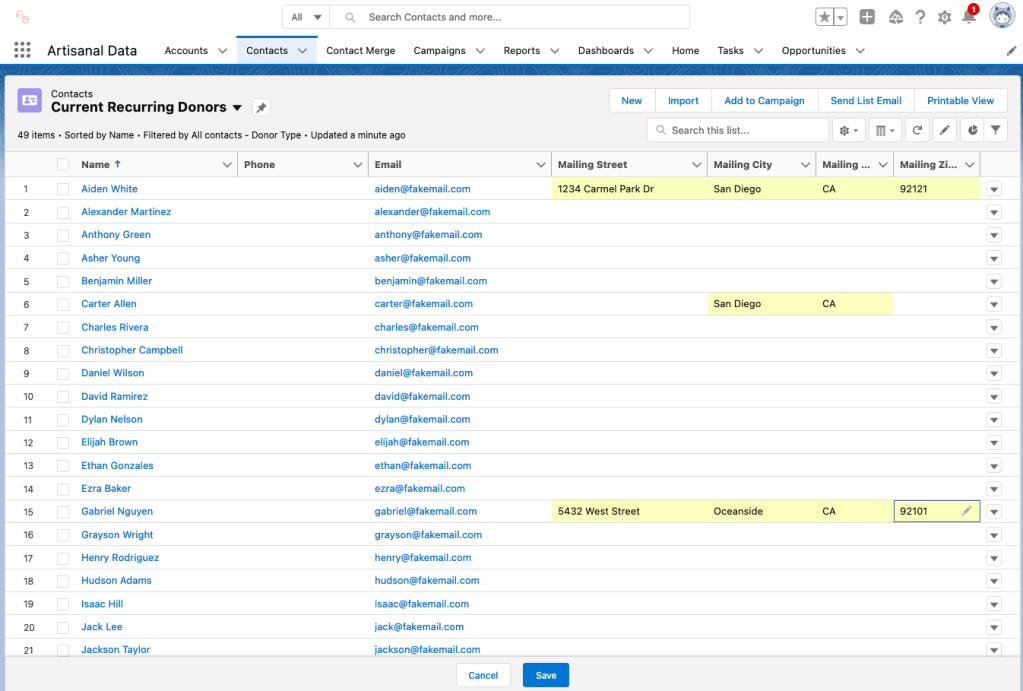
Form Assembly is a tool lots of organizations haven’t heard of, but it is affordable for non-profits and cuts down on manual data entry and/or data imports. An organization I know uses Form Assembly to send out a custom form to donors each year, asking them to provide a mailing address for their donor sticker. The donor clicks the link for their own version of the form and just fills in their mailing address – Form Assembly updates the right Contact record in Salesforce immediately. The donor has a faster form and the organization has no manual data entry – they just run a Salesforce report and send out stickers!

Salesforce Releases

Check out this Salesforce Ben writeup of Flow Trigger Explorer. This looks like it will be a great tool, and exceptionally helpful for anyone inheriting an org with a lot of Flows. This same post highlights some other exciting Flow improvements.

NPSP Release Information

Winter ’22 highlights for Non Profits Release Notes are available. They include useful info on Multi-Factor Authentication, Flow, and Flow Orchestrator.

If you’d been getting error messages when using the Manage Household feature, that should be fixed by the latest NPSP release, 3.211.

Scary Emails from Salesforce

I didn’t get any scary emails from Salesforce since the last update! If you did, let me know and I’ll look into them.

October 2021 Salesforce

Inspiration

If you’re not using in-line editing of List Views, now is the time to start! It is easy to create list views for yourself and use them to efficiently update records. Anyone who hates to update records can get a productivity boost from this feature, and it tends to make people a lot more willing to go into Salesforce and track their work.

A particularly nice version of this is the Kanban view for Tasks, which lets you drag and drop tasks to a new status.

Scary Emails from Salesforce


Salesforce sometimes sends emails telling you that you have to do something, but then making it very difficult to figure out if you really have to do something. In September, Salesforce sent out an email about a problem with Apple’s iOS 15 and the Salesforce Mobile App. If you use the Salesforce Mobile App on an Apple device, make sure you’ve updated the app.

Another recent email was sent about legacy API versions no longer being supported. These API versions are really old, and most likely this doesn’t effect you unless you’ve got custom code that is several years old.

Regular Maintenance


Are you backing up your data? Lots of organizations think they are because they’ve scheduled weekly exports, but you’ve also got to download that file each week – Salesforce doesn’t save it for you! At Dreamforce, Salesforce announced that they’re working on a native Backup & Restore product, but until that’s available, make sure you’re downloading a weekly export and saving it someplace safe, or using a third-party backup and restore tool.

To do weekly backups, go to Setup and search for Data Export. Then schedule an export for a day that is convenient for you. Salesforce will email you when the zip file is ready. Then download and save! Documentation is available here.

Dreamforce Announcements

Salesforce announced that Workflow Rules and Process Builder will be retired – at some point. This process will definitely take time, but it is a good time to start to migrate your Workflow Rules to Flows. Nearly all organizations have some active Workflow Rules. If you’ve got questions about this, let me know!

Salesforce also spent some time generating excitement about new options for Salesforce-Slack integrations. Until recently, most small to medium non-profits haven’t had obvious use cases for that integration, but that’s probably changing over the next year. If you’re an organization where people use Slack more than Salesforce and you’d like to drive more Salesforce usage, these integrations may be a great tool for that.

NPSP release information

Version 3.208 had bug fixes for GAU Rollups and Contact Merge errors. More info here.

Salesforce release information

Winter 22 is now in production orgs. See the September post for new features you might be interested in.

Spring 22 is coming, beginning in mid-January. Folks who write about Salesforce will have more content to dig into in the next few months, but some features you might be interested in are:
• Dynamic Gauge Charts for Dashboards are in Beta. If you’ve been frustrated that Gauge Chart goals have to be manually updated, this one is for you!
• More inline editing of Reports is now available.
• Salesforce Maps improvements
• Google and Microsoft integration improvements

When a spreadsheet is enough

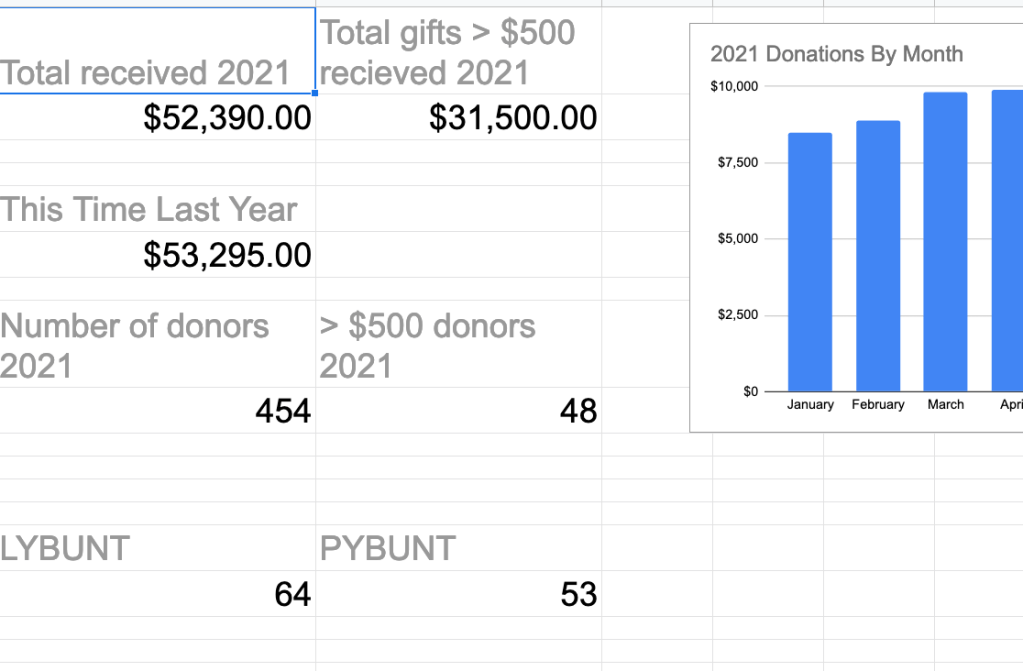
Sometimes you don’t need a CRM. Small non-profits, especially very new ones, usually start to track all kinds of things in spreadsheets. The spreadsheets can get out of hand quickly, but the same principles that guide a good CRM can be applied to a google sheet. For example, this pretty simple data can stay in that google sheet, but we can add this as another tab to show a dashboard of this data.

Data Tab

Dashboard Tab

September 2021 Salesforce

Inspiration

Flexible page layouts are one of the best things about Salesforce. In the past, page layouts could be different based on the profile of the user or the record type. Lately, though, Salesforce has been making it easier to make the page layouts change based on the specifics of the record you’re looking at. For instance, take a look at this contact record. This org only has one contact record type, but it shows the upper right hand box only for donors who have given $5000 or more in a single calendar year. 

This is possible because of dynamic actions, which became available in Summer ‘21. Salesforce has released dynamic forms for custom objects, but not standard objects. Until that’s available, the workaround above pretty nice. I learned how to do it from this video

Scary Emails from Salesforce

Salesforce sometimes sends emails telling you that you have to do something, but then making it very difficult to figure out if you really have to do something. The latest one that I’ve seen is the ICU Locales email. The subject is: ACTION REQUIRED: Adopt ICU Locale Formats in Salesforce.

If you are in the US and don’t have custom code, this is unlikely to affect you. If you have custom code, you should talk to your developer about this.

If you’ve got pretty popular apps installed that get regularly updated, the app developer is very likely to update their app before this change is enforced. If you’ve an old app that hasn’t been updated in a long time, this might be a good time to uninstall it, or replace it with something newer. Lots of apps that don’t get updated anymore are easily replaceable with a flow!

This explanation here is the best one I’ve found about this change. If you got this email and this article doesn’t answer your questions, let me know, it makes sense to me and I’d be happy to help you figure out if you need to take action. 

Regular Maintenance

Your Salesforce instance is a lot like a garden. Salesforce gives you a plot of dirt with a few raised beds, and it is up to you to plant, weed, fertilize, and all the rest. (I love this analogy, but it is ridiculous because I can’t even grow mint.) Most small to medium sized organizations don’t have the resources to do all of the maintenance that would be required for an inspiring Salesforce instance, but doing a little is a lot better than doing nothing. Each month, I’ll make one suggestion for some maintenance you can do – your future self will thank you for doing any of it!

This month’s suggestion is to run NPSP Health Check. There’s free training on how to do that here. Health Check can turn up little problems with data and configuration that can turn into real headaches later.

Salesforce release information that might interest you

Summer ‘21 Highlights

  • Flow updates! If you’ve been slowly switching from workflow rules and process builder to flows, things are getting better all the time. Jen Lee has a great blog and always has terrific flow content. She’s got an article about the flow improvements in Summer ‘21. 
  • Inline editing of reports (beta)
  • Download a Dashboard as an image file  – perfect for sharing dashboards with team members who aren’t Salesforce users. 

Winter ‘22 Highlights

  • More flow updates, including flow orchestrator
  • More inline editing of reports, and the feature will be out of beta
  • Email Template Builder updates

NPSP release information that might interest you

Primary address type bug introduced in NPSP 3.201 (July 13): When a customer switches the Contact’s Primary Address Type (npe01__Primary_Address_Type__c) field to “None” (usually if clearing out mailing address fields), the Primary Address Type value switches to “Mailing”. More information is available here

NPSP 3.204 (July 27) included an update to support yearly installment periods in the number of days from next donation setting. More information is available here

NPSP 3.202 (July 9) included an emergency fix to handle an issue with Household Account naming and exclusion fields. More information is available here